The new iPhone 3G cannot be unlocked by any software solution till date.
All websites claiming to have a solution are scam, We advise all users to be careful.
The only solution in the world to unlock iPhone 3G is Rebel Simcard.
Because Rebel Simcard goes along with your network simcard into you iPhone 3G and
bypasses the network locks without doing any firmware modification.
Here is a complete manual on how to unlock your iPhone 3G.
First you would need to identify that your iPhone 3G is in what state as of now.
There are only 2 possible states as of now.
Switch on your iPhone 3G.
1. State 1 : You can see itunes logo along with a usb cable, and a slide button showing “Slide for emergency”.
If you slide the bar then a keypad appears.
If this is the case your Phone is not activated, and you will have to activate your phone before you can unlock it.
2. State 2 : You have switched on your iPhone 3G and you can see the springboard with a lot of icons like SMS, Calender etc..
You are lucky!! Unlocking your iPhone is very simple now.
If your iPhone is in State 1 listed above, follow these procedures.
Please note : All info available here is only for educational purposes, We are not responsible in any case whatsoever how you use this information.
http://www.iclarified.com/entry/index.php?enid=1573
Once you have followed this procedure, your iPhone menu will appear, which means your iPhone is activated and now is equivalent to Stage 2 listed above.
Now you should follow the stage 2 procedure to unlock your iPhone 3G.
If your iPhone 3G is in State 2 listed above, follow these procedures.
You will need.
1. Rebel Simcard – Buy one from www.rebelsimcard.com
2. A network simcard which you want to use on your iPhone 3G.
3. Any other phone to test the simcard you want to use on your iPhone 3G.
4. Rebel Simcard cutter to cut your original network simcard.
Now follow the following steps exactly as listed.
1. Switch on the other phone with the simcard which you want to use on your iPhone 3G.
Make a call to make sure your simcard is working fine and also this step will enable your sim to
receive some data from your network which is required for further process.
2. Now take out simcard from this phone.
3. Now take your iPhone 3G, enable Airplane mode and disable 3G and put the Rebel Simcard along with this simcard in your iPhone 3G.
Wait a few seconds, and disable Airplane mode to get network on phone.
Your phone should get network. (If it doesn’t get network, please try to switch off your iPhone for 5 minutes and retry the whole process. )
Now you can use your iPhone 3G as if it was unlocked.
You can now use EDGE, GPRS and all functions of iPhone 3G.
3G service depends on the type of simcard you have and it also depends on the availability of 3G network in your area.
All those countries where there is no 3G, users are advised to switch off 3G mode.
Please note : You should not skip step1 listed above.
Before you should start to unlock your iPhone. You should know which iPhone you have.
This manual will take you step by step to make your iPhone 2G working with any network.
We will choose the best possible way available till today to make your iPhone working on any network.
All those who have a bricked iPhone can also follow these steps.
Which iPhone do you have ?
1. iPhone 2G (The older iPhones are called iPhone 2G. You can see this image to check which iPhone you have.)
2. iPhone 3G ( The newer iPhone is the iPhone 3G. You can see its image here.
If you have iPhone 2G, Please follow the following steps. For iPhone 3G procedure there is another post coming up on this blog.
iPhone 2G – Step by Step procedure for Windows users.
iPhone 2G users are more lucky, The latest version of iPhone can be unlocked and jailbroken to use any network simcard.
Phone will work fully with all features using this procedure.
However iPhone 3G can only be jailbroken but cannot be unlocked, The only solution in this world to unlock the iPhone 3G is Rebel Simcard.
Please Note : With this procedure you will lose all data on your iPhone , and it will become like a new out of the box phone. This means you will lose all your contacts, images, etc…
1. You should download the following softwares.
a. iTunes 7.7 Download from apple.com
b. Firmware 2.0 for iPhone (Tested) Download Part1.Download Part2.
c. WinPwn Download here or find a latest version from http://www.winpwn.com
d. .Net 2.0 Framework Download here.
e. 3.9BL
f. 4.6BL
After downloading all this,
Install
1. iTunes 7.7.
2. .Net 2.0 Framework.
3. WinPwn.
Please note
– You MUST do a full uninstall of winpwn before installing the new version
– Make sure you have the latest version of iTunes ( Currently 7.7)
– WinPwn uses 300MB of ram at peak due to the ipsw being extracted in memory
– If you already have service with AT&T do not activate or install Youtube Fix
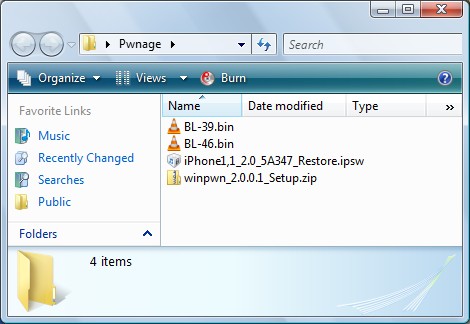
Create a folder on your desktop called Pwnage. In it place the following files: Winpwn , 3.9BL , 4.6BL , and the latest 2.0 firmware.
Install WinPwn by extracting the downloaded zip from Step One and running the setup executable. Once WinPwn has been installed it will put a shortcut icon on your desktop. Double click to launch the application.

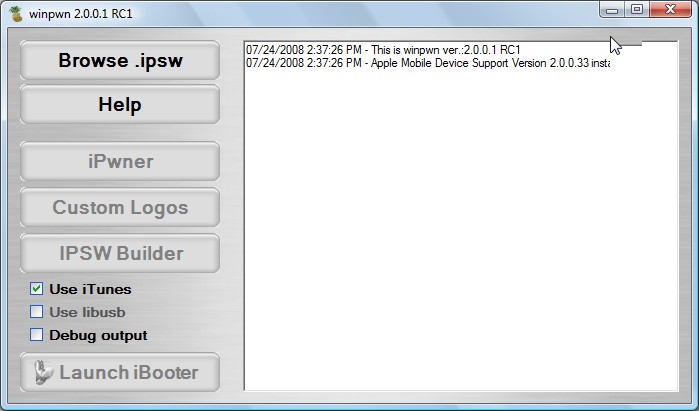
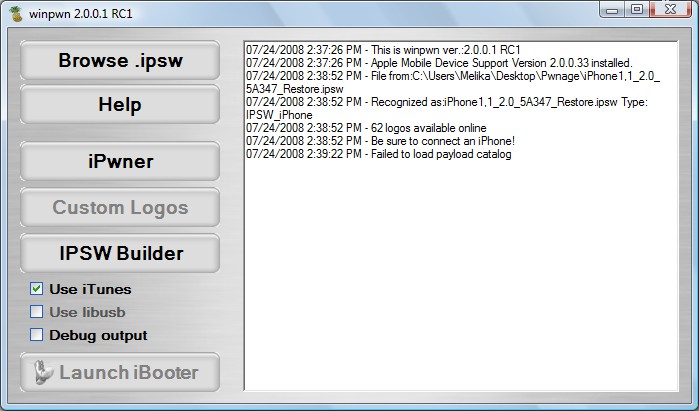
Once WinPwn has opened click the Browse .ipsw button.
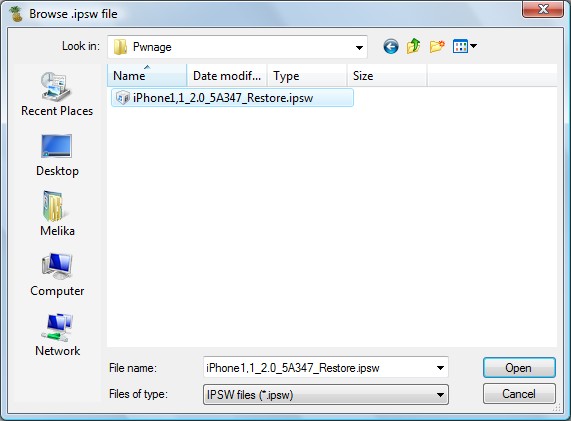
Locate the 2.0 firmware file (iPhone1,1_2.0_5A347_Restore.ipsw) from the Pwnage folder on your desktop and click Open.
WinPwn will check the firmware to make sure its valid. Now click the IPSW Builder button
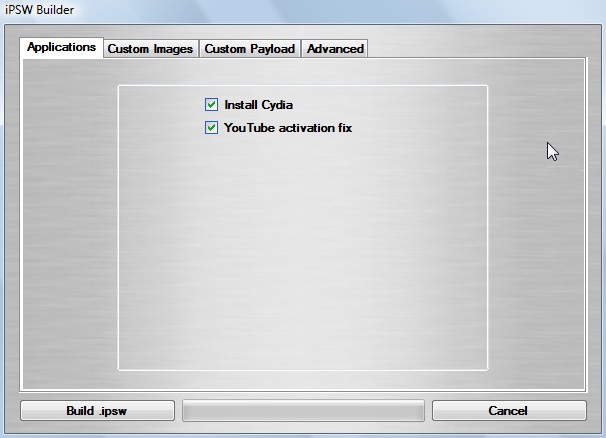
The IPSW Builder window will open to the Applications tab. Check to select Cydia and if you are not on AT&T then check to select YouTube Fix.
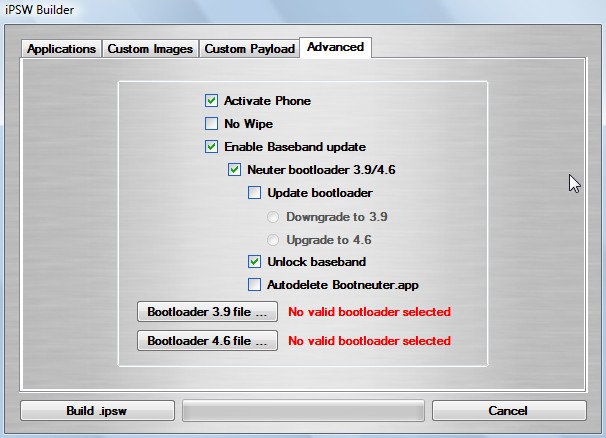
Click to select the Advanced tab. Check to select: Activate Phone, Enable Baseband update, and Unlock baseband. Same settings as shown in this image.
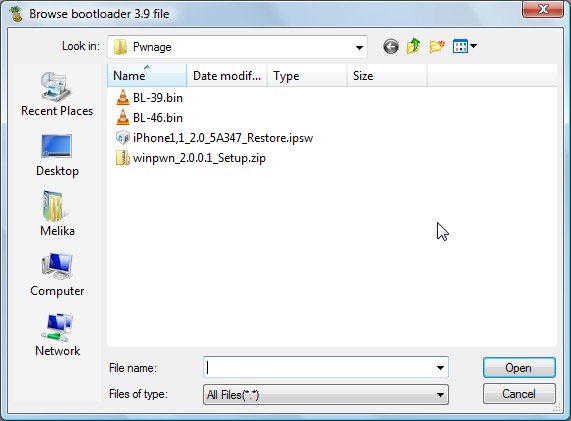
We will also need to load the Bootloader files. Click the Bootloader 3.9 button and then select the BL39.bin file in your Pwnage Folder. Then click the Bootloader 4.6 button and select the BL46.bin file in your Pwnage Folder.
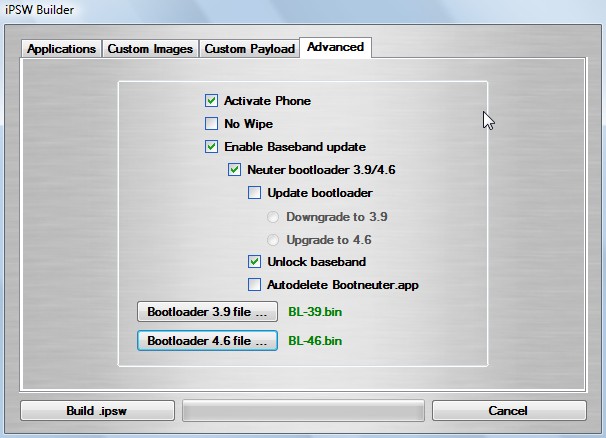
Click the Build .ipsw button at the bottom left to build your custom ipsw firmware file. Navigate to your Pwnage folder and click the Save button
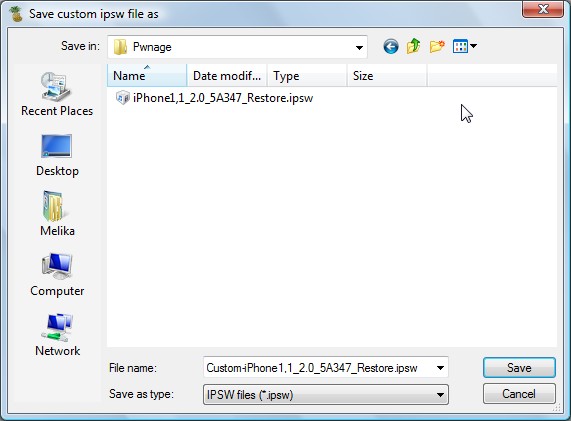
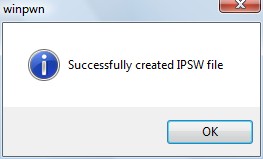
Once WinPwn has finished creating your custom firmware then click the iPwner button from the main menu.
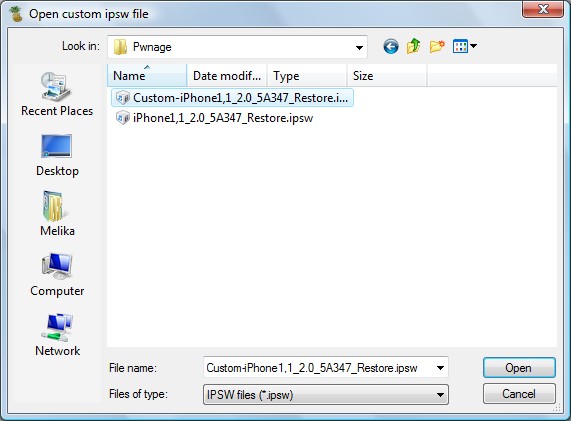
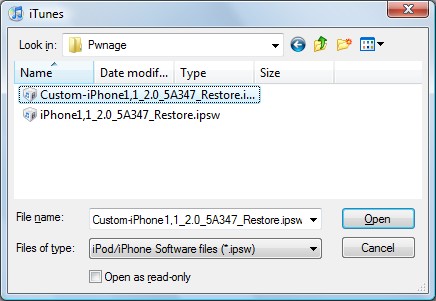
Select the custom firmware file we just built from the Pwnage folder on your desktop and click the Open button.
You will then be notified that your iTunes has been Pwned!
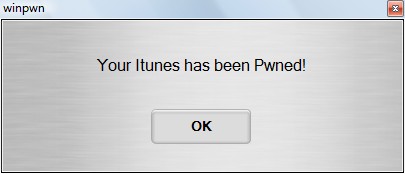
Next we will need to put the iPhone in the DFU mode and restore using iTunes. To put your iPhone into DFU mode please follow these instructions!
Press and hold the Home button and the Sleep/Wake button at the same time.
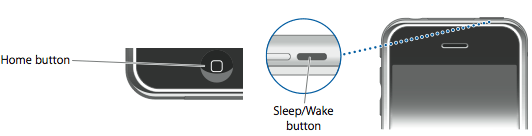
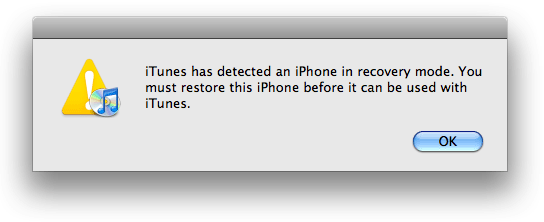
After exactly 10 seconds release the Sleep/Wake button. Continue holding the home button until you iTunes pops up a message telling you that it has detected an iPhone in recovery mode.

The iPhone screen will remain black like this:

If you see the itunes logo and cable here, then you are doing wrong!!! The phone must be black screen like this. Most users make this mistake, be careful.
Hold down Shift and click the Restore button in iTunes.
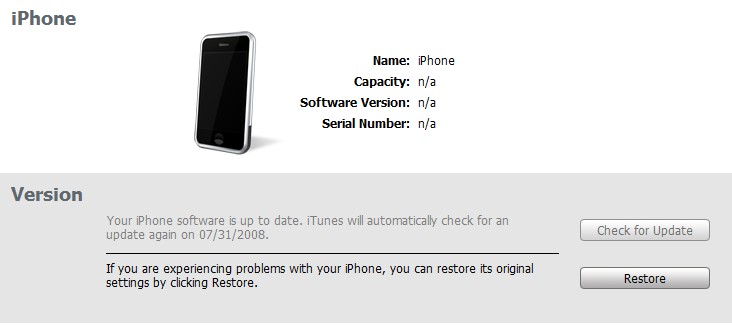
A popup window will appear asking you to select your firmware. Select the Custom firmware file we saved in the Pwnage folder and then click the Open button.
Once the restore is complete a software will automatically run on your iPhone screen.
It will take around 5-10 min to finish, and your phone will be unlocked and jailbroken.
Now just insert your simcard and use it with any network simcard!!
Detailed below are the GPRS settings for various worldwide networks. You should note that we cannot guarantee the correctness or validity of the GPRS settings published below and therefore cannot guarantee that the GPRS settings below will work with your Nokia phone. It is also worth noting that many network require GPRS services to be activated on a phone account before GPRS services can be accessed via a mobile phone, therefore you should check with your network service provider to make sure that you have GPRS activated on your phone account before attempting to change GPRS settings on your phone.
Australia –
Operator: – Optus
GPRS APN: – internet
Username: – {blank}
Password: – {blank}
DNS: – 202.139.83.3, 192.65.91.129
Operator: – Telstra
GPRS APN: – telstra.internet
Username: – {blank}
Password: – {blank}
DNS: – 139.130.4.4, 203.50.170.2
Operator: – Three
GPRS APN: – 3netaccess
Username: – a
Password: – a
DNS: – 202.124.68.130, 202.124.76.66
Operator: – Vodafone
GPRS APN: – vfinternet.au
Username: – {blank}
Password: – {blank}
DNS: – 192.189.54.33, 210.80.58.3
Austria –
Operator: – Connect Austria
GPRS APN: – web.one.at
Username: – {user specific}
Password: – {user specific}
DNS: – 194.24.128.100, 194.24.128.102
Operator: – Max Online
GPRS APN: – gprsinternet
Username: – GPRS
Password: – {blank}
DNS: – 213.162.64.1, 213.162.64.2
Operator: – Max Online Business
GPRS APN: – business.gprsinternet
Username: – GPRS
Password: – {blank}
DNS: – 213.162.64.1, 213.162.64.2
Operator: – Max Online Metro
GPRS APN: – gprsmetro
Username: – GPRS
Password: – {blank}
DNS: – 213.162.64.1, 213.162.64.2
Operator: – Mobilkom A1
GPRS APN: – A1.net
Username: – gprs@a1plus.at
Password: – {blank}
DNS: – 194.48.124.200, 194.48.139.254
Operator: – Tele.Ring
GPRS APN: – web
Username: – web@telering.at
Password: – web
DNS: – 212.95.31.11, 212.95.31.35
Belgium –
Operator: – Mobistar
GPRS APN: – web.pro.be
Username: – mobistar
Password: – mobistar
DNS: – 212.65.63.10, 212.65.63.145
Operator: – Proximus
GPRS APN: – internet.proximus.be
Username: – {blank}
Password: – {blank}
DNS: – 195.238.2.21, 195.238.2.22
Canada –
Operator: – Microcell
GPRS APN: – internet.fido.ca
Username: – fido
Password: – fido
DNS: – 204.92.15.211
Czech Republic –
Operator: – Cesky Mobil (contract)
GPRS APN: – internet
Username: – {blank}
Password: – {blank}
DNS: – 212.67.64.2
Operator: – Cesky Mobil (prepaid)
GPRS APN: – cinternet
Username: – {blank}
Password: – {blank}
DNS: – 212.67.64.2
Operator: – Eurotel (contract)
GPRS APN: – internet
Username: – {blank}
Password: – {blank}
DNS: – 160.218.10.200, 160.218.43.200
Operator: – Eurotel Go
GPRS APN: – gointernet
Username: – {blank}
Password: – {blank}
DNS: – 160.218.10.201, 194.228.2.1
Operator: – Oscar (contract)
GPRS APN: – internet
Username: – {blank}
Password: – {blank}
DNS: – 217.77.161.130, 217.77.161.131
Operator: – Oscar (Oskarta)
GPRS APN: – ointernet
Username: – {blank}
Password: – {blank}
DNS: – 217.77.161.130, 217.77.161.131
Operator: – T-Mobile
GPRS APN: – internet.t-mobile.cz
Username: – {blank}
Password: – {blank}
DNS: – 62.141.0.1, 62.141.0.2
Denmark –
Operator: – TDC
GPRS APN: – internet
Username: – {blank}
Password: – {blank}
DNS: – 193.162.146.9, 193.162.153.31
Operator: – Sonofon
GPRS APN: – {blank}
Username: – {blank}
Password: – {blank}
DNS: – 212.88.64.14, 212.88.64.15
Operator: – Orange DK
GPRS APN: – web.orange.dk
Username: – {blank}
Password: – {blank}
DNS: – 212.97.206.131, 212.97.206.161
Estonia –
Operator: – EMT
GPRS APN: – internet.emt.ee
Username: – {blank}
Password: – {blank}
DNS: – 217.71.33.200, 217.71.32.20
Finland –
Operator: – Dna
GPRS APN: – internet
Username: – {blank}
Password: – {blank}
DNS: – 217.78.192.78, 217.78.192.22
Operator: – Radiolinja
GPRS APN: – internet
Username: – {blank}
Password: – {blank}
DNS: – 213.161.33.200, 193.185.210.10
Operator: – Sonera
GPRS APN: – internet
Username: – {blank}
Password: – {blank}
DNS: – 192.89.123.230, 192.89.123.231
France –
Operator: – Bouygues
GPRS APN: – ebouygtel.com
Username: – {blank}
Password: – {blank}
DNS: – 62.201.129.99, 62.201.159.99
Operator: – Bouygues (B2Bouygtel)
GPRS APN: – b2bouygtel.com
Username: – {blank}
Password: – {blank}
DNS: – 62.201.129.99
Operator: – SFR
GPRS APN: – websfr
Username: – {blank}
Password: – {blank}
DNS: – 172.20.2.10, 194.6.128.4
Operator: – Orange
GPRS APN: – orange.fr
Username: – orange
Password: – orange
DNS: – 194.051.003.056, 194.051.003.076
Germany –
Operator: – D2 Vodafone
GPRS APN: – web.vodafone.de
Username: – {any}
Password: – {any}
DNS: – 139.7.30.125, 139.7.30.126
Operator: – E-Plus
GPRS APN: – internet.eplus.de
Username: – eplus
Password: – gprs
DNS: – 212.023.97.2, 212.23.97.3
Operator: – D1 T-Mobile
GPRS APN: – internet.t-d1.de
Username: – td1
Password: – gprs
DNS: – 193.254.160.1
Operator: – O2 (Viag Interkom)
GPRS APN: – internet
Username: – {blank}
Password: – {blank}
DNS: – 195.182.096.28, 195.182.96.61
Greece –
Operator: – Telestet
GPRS APN: – gnet.b-online.gr
Username: – {your phone number}
Password: – 24680
DNS: – 212.152.79.19, 212.152.79.20
Operator: – Vodafone GR
GPRS APN: – internet.vodafone.gr
Username: – {blank}
Password: – {blank}
DNS: – 213.249.17.10, 213.249.17.11
Operator: – Cosmote
GPRS APN: – internet
Username: – {blank}
Password: – {blank}
DNS: – 195.167.065.194
Hongkong –
Operator: – CSL
GPRS APN: – hkcsl or internet
Username: – {blank}
Password: – {blank}
DNS: – 202.84.255.1, 203.116.254.150
Operator: – SmarTone
GPRS APN: – internet
Username: – {blank}
Password: – {blank}
DNS: – 202.140.96.51, 202.140.96.52
Hungary –
Operator: – Pannon (contract)
GPRS APN: – net
Username: – {blank}
Password: – {blank}
DNS: – 193.225.155.254, 194.149.0.157
Operator: – Pannon (flat rate)
GPRS APN: – netx
Username: – {blank}
Password: – {blank}
DNS: – 193.225.155.254, 194.149.0.157
Operator: – Vodafone (prepaid)
GPRS APN: – vitamax.snet.internet.net
Username: – {blank}
Password: – {blank}
DNS: – 80.244.97.30, 80.244.96.1
Operator: – Vodafone (contract)
GPRS APN: – standardnet.vodafone.hu
Username: – {blank}
Password: – {blank}
DNS: – 80.244.97.30, 80.244.96.1
Operator: – Westel (contract)
GPRS APN: – internet
Username: – {user specific}
Password: – {user specific}
DNS: – 194.176.224.3, 194.176.224.1
India –
Operator: – BPL
GPRS APN: – bplgprs.com
Username: – bplmobile
Password: – {blank}
DNS: – 202.169.145.34, 202.169.129.40
Operator: – Orange
GPRS APN: – portalnmms
Username: – {blank}
Password: – {blank}
DNS: – 10.11.206.51, 10.11.206.50
Indonesia –
Operator: – Indosat
GPRS APN: – satelindogprs.com
Username: – {blank}
Password: – {blank}
DNS: – 202.152.162.66, 202.152.162.67
Ireland –
Operator: – O2 (contract)
GPRS APN: – open.internet
Username: – gprs
Password: – gprs
DNS: – 62.40.32.33, 62.40.32.34
Operator: – O2 (prepaid)
GPRS APN: – pp.internet
Username: – gprs
Password: – gprs
DNS: – 62.40.32.33, 62.40.32.34
Israel –
Operator: – MTC-Vodafone
GPRS APN: – apn01
Username: – {blank}
Password: – {blank}
DNS: – 10.10.10.30
Italy –
Operator: – BLU Contratto
GPRS APN: – INTERNET
Username: – {blank}
Password: – {blank}
DNS: – 212.17.192.49, 212.17.192.49
Operator: – BLU Prepagata
GPRS APN: – PINTERNET
Username: – {blank}
Password: – {blank}
DNS: – 212.17.192.49, 212.17.192.49
Operator: – Vodafone Omnitel
GPRS APN: – web.omnitel.it
Username: – {blank}
Password: – {blank}
DNS: – 194.185.97.134
Operator: – TIM
GPRS APN: – uni.tim.it
Username: – {blank}
Password: – {blank}
DNS: – 213.230.155.94, 213.230.130.222
Operator: – Wind
GPRS APN: – internet.wind
Username: – {blank}
Password: – {blank}
DNS: – 212.245.255.2
Lithuania –
Operator: – Bite GSM
GPRS APN: – banga
Username: – {blank}
Password: – {blank}
DNS: – 213.226.131.131, 193.219.32.13
Operator: – Omnitel Lithuania
GPRS APN: – gprs.omnitel.net
Username: – {blank}
Password: – {blank}
DNS: – 194.176.32.129, 195.22.175.1
Luxembourg –
Operator: – LUXGSM
GPRS APN: – web.pt.lu
Username: – {blank}
Password: – {blank}
DNS: – 194.154.192.101, 194.154.192.102
Netherlands –
Operator: – KPN Mobile
GPRS APN: – internet
Username: – {blank}
Password: – {blank}
DNS: – 62.133.126.28, 62.133.126.29
Operator: – T-Mobile
GPRS APN: – internet
Username: – t-mobile
Password: – t-mobile
DNS: – 193.79.237.39, 193.79.242.39
Malaysia –
Operator: – DIGI
GPRS APN: – diginet
Username: – {blank}
Password: – {blank}
DNS: – 203.92.128.131, 203.92.128.132
Operator: – Maxis
GPRS APN: – internet.gprs.maxis
Username: – {blank}
Password: – {blank}
DNS: – 202.75.129.101, 10.216.4.21
Operator: – Timecel
GPRS APN: – timenet.com.my
Username: – {blank}
Password: – {blank}
DNS: – 203.121.16.85, 203.121.16.120
Operator: – TM Touch
GPRS APN: – internet
Username: – {blank}
Password: – {blank}
DNS: – 202.188.0.133
Norway –
Operator: – Netcom
GPRS APN: – internet.netcom.no
Username: – {blank}
Password: – {blank}
DNS: – 212.45.118.43, 212.45.118.44
Poland –
Operator: – ERA
GPRS APN: – erainternet
Username: – erainternet
Password: – erainternet
DNS: – 213.158.194.1
Operator: – Idea
GPRS APN: – www.idea.pl
Username: – idea
Password: – idea
DNS: – 194.9.223.79, 194.204.159.1
Operator: – Plus GSM/Polkomtel
GPRS APN: – www.plusgsm.pl
Username: – {blank}
Password: – {blank}
DNS: – 212.2.96.51, 212.2.96.52
Philippines –
Operator: – Globe
GPRS APN: – www.globe.com.ph
Username: – globe
Password: – globe
DNS: – 203.127.225.10, 203.127.225.11
Operator: – Smart
GPRS APN: – internet
Username: – {blank}
Password: – {blank}
DNS: – 202.57.96.3, 202.57.96.4
Portugal –
Operator: – Optimus
GPRS APN: – internet
Username: – {blank}
Password: – {blank}
DNS: – 194.79.69.129
Operator: – TMN
GPRS APN: – internet
Username: – {blank}
Password: – {blank}
DNS: – 194.65.3.20, 194.65.3.21
Operator: – Vodafone (Telcel)
GPRS APN: – internet.vodafone.pt
Username: – {blank}
Password: – {blank}
DNS: – 212.18.160.133, 212.18.160.134
Russia –
Operator: – BeeLine
GPRS APN: – internet.beeline.ru
Username: – {blank}
Password: – {blank}
DNS: – 194.190.195.66, 194.190.192.34
Operator: – MTS
GPRS APN: – internet.mts.ru
Username: – mts
Password: – mts
DNS: – 213.87.0.1, 213.87.1.1
Serbia-Montenegro –
Operator: – Mobtel Srbija
GPRS APN: – internet
Username: – mobtel
Password: – gprs
DNS: – 217.65.192.1
Operator: – Telekom Srbija
GPRS APN: – gprsinternet
Username: – mts
Password: – 064
DNS: – 195.178.38.3
Singapore –
Operator: – M1
GPRS APN: – mobilenet
Username: – {blank}
Password: – {blank}
DNS: – 202.79.64.21, 202.79.64.26
Operator: – SingTel
GPRS APN: – internet
Username: – {blank}
Password: – {blank}
DNS: – 165.21.100.88, 165.21.83.88
Operator: – Starhub
GPRS APN: – shwapint
Username: – {blank}
Password: – {blank}
DNS: – 203.116.1.78, 203.116.254.150
Slovenia –
Operator: – Mobitel
GPRS APN: – internet
Username: – {blank}
Password: – {blank}
DNS: – 193.189.160.11, 193.189.160.12
Operator: – Si.mobil
GPRS APN: – internet.si.mobil
Username: – {blank}
Password: – {blank}
DNS: – 80.95.225.230, 80.95.225.231
Spain –
Operator: – Amena
GPRS APN: – internet
Username: – CLIENTE
Password: – AMENA
DNS: – 213.143.33.8, 213.143.32.20
Operator: – Telefonica (Movistar)
GPRS APN: – movistar.es
Username: – movistar
Password: – movistar
DNS: – 194.179.001.100, 194.179.001.101
Operator: – Vodafone (Airtel)
GPRS APN: – airtelnet.es
Username: – vodafone
Password: – vodafone
DNS: – 212.73.32.3, 212.73.32.67
Switzerland –
Operator: – Orange
GPRS APN: – internet
Username: – {blank}
Password: – {blank}
DNS: – 213.55.128.1, 213.55.128.2
Operator: – Sunrise
GPRS APN: – internet
Username: – internet
Password: – internet
DNS: – 212.35.35.35, 212.35.35.5
Operator: – Swisscom
GPRS APN: – gprs.swisscom.ch
Username: – {blank}
Password: – {blank}
DNS: – 164.128.36.34, 164.128.76.39
Taiwan –
Operator: – Chunghwa Telekom
GPRS APN: – emome or internet
Username: – {blank}
Password: – {blank}
DNS: – 10.1.1.1
Operator: – Far EasTone
GPRS APN: – fetnet01
Username: – {blank}
Password: – {blank}
DNS: – 210.241.199.199
Thailand –
Operator: – AIS
GPRS APN: – internet
Username: – {blank}
Password: – {blank}
DNS: – 202.183.255.20, 202.183.255.21
Operator: – DTAC
GPRS APN: – www.dtac.co.th
Username: – {blank}
Password: – {blank}
DNS: – 203.155.33.1, 203.44.144.33
Turkey –
Operator: – Aria
GPRS APN: – aycell
Username: – {user specific}
Password: – {user specific}
DNS: – 212.156.4.1, 212.156.4.4
Operator: – Turkcell
GPRS APN: – internet
Username: – {blank}
Password: – {blank}
DNS: – 212.252.168.240, 212.252.119.4
UK –
Operator: – BT Mobile
GPRS APN: – btmobile.bt.com
Username: – bt
Password: – bt
Gateway IP: – 212.183.137.12
Operator: – Jersey Telecom
GPRS APN: – pepper
Username: – {blank}
Password: – {blank}
DNS: – 212.9.0.135, 212.9.0.135
Operator: – O2 UK (contract)
GPRS APN: – wap.o2.co.uk
Username: – o2wap
Password: – password
Gateway IP: – 193.113.200.195
Operator: – O2 UK (pre-pay)
GPRS APN: – payandgo.o2.co.uk
Username: – payandgo
Password: – password
Gateway IP: – 193.113.200.195
Operator: – Orange UK
GPRS APN: – orangeinternet
Username: – {blank}
Password: – {blank}
Gateway IP: – 192.168.71.35
Operator: – T-Mobile
GPRS APN: – general.t-mobile.uk
Username: – user
Password: – wap
Gateway IP: – 149.254.1.10
Operator: – Tesco Mobile
GPRS APN: – prepay.tesco-mobile.com
Username: – tescowap
Password: – password
Gateway IP: – 193.113.200.195
Operator: – Virgin Mobile
GPRS APN: – goto.virginmobile.uk
Username: – user
Password: – {blank}
Gateway IP: – 193.30.166.3
Operator: – Vodafone (Contract)
GPRS APN: – wap.vodafone.co.uk
Username: – wap
Password: – wap
Gateway IP: – 212.183.137.12
Operator: – Vodafone (pre-pay)
GPRS APN: – pp.vodafone.co.uk
Username: – wap
Password: – wap
Gateway IP: – 212.183.137.12
USA –
Operator: – Cingular
GPRS APN: – isp.cingular
Username: – ISPDA@CINGULARGPRS.COM
Password: – CINGULAR1
DNS: – 66.209.10.201, 66.209.10.202
Operator: – T-Mobile (Internet)
GPRS APN: – internet2.voicestream.com
Username: – {blank}
Password: – {blank}
DNS: – 216.155.175.105, 216.155.175.106
Solutions Point Limited, UK today introduces its flagship product, Rebel Sim card which can bypass network locks on all mobile phones.
Rebel Sim card has been released today by Solutions Point Limited, UK, they claim this product to be in the line of those smart technological solutions who will bring a revolution in the mobile phone unlocking industry, it would revolutionarise the way people use their mobile phones, by bringing in options which were not possible before.
Rebel Sim card can bypass network locks on almost all phones available in the market till date, and it would also support 95% of upcoming phone models out of the box, without making any changes to Rebel Sim card.
Rebel Sim card is used in parallel to the existing sim card as its only 0.10mm thick, therefore can be inserted along with existing simcard in any of the mobile phones available throughout the world.
It can also be removed easily, without causing any damage to the phone and the phone does not lose its warranty!
Rebel Simcard is the World’s first sim card which is fully compatible with UMTS technologies, which means users will get the same quality of service as they would get with a fully unlocked phone.
Rebel Sim card is transparent to the mobile phone, it does not interrupt in any of the existing features the simcard or the mobile phone has to offer either it be emails, Wifi, Bluetooth, 3G, GPS or any other service, rather it enhances the existing features with its proprietary menu which gives the user a whole lot of control over how Rebel Sim card functions for a particular mobile phone.
Rebel Sim card is backed up by experienced and highly skilled development team along with hundreds of beta testers throughout the world, who test Rebel Sim card on almost any new phone which is released in any part of the world.
Rebel Sim card also has a STK menu, Apart from giving better control to the end user on the Rebel Simcard features, This menu enables it to run high security applications like banking services, transactions etc, moreover it enhances the existing network simcard by adding more features to it, like Value Added Services, Telecom applications, Logos, Ringtones etc. This makes it a one and only choice for MVNO’s who are trying to discover new lands and increase their market share.
However the technology behind bypassing of network locks on a mobile phone looks rather complex and is no way a game of a common man, but by bringing the ease of use and simplicity Rebel Sim card provides to unlock a mobile phone to common people who know nothing about this technology, depicts a fine example, how difficult things can be made so simple by people who are behind such technologies and are working hard and writing new rules of the game